

Case Study · Our Own Site
Same Page, Two Scores: SAGE and AISearch Pulse on Our Own Homepage
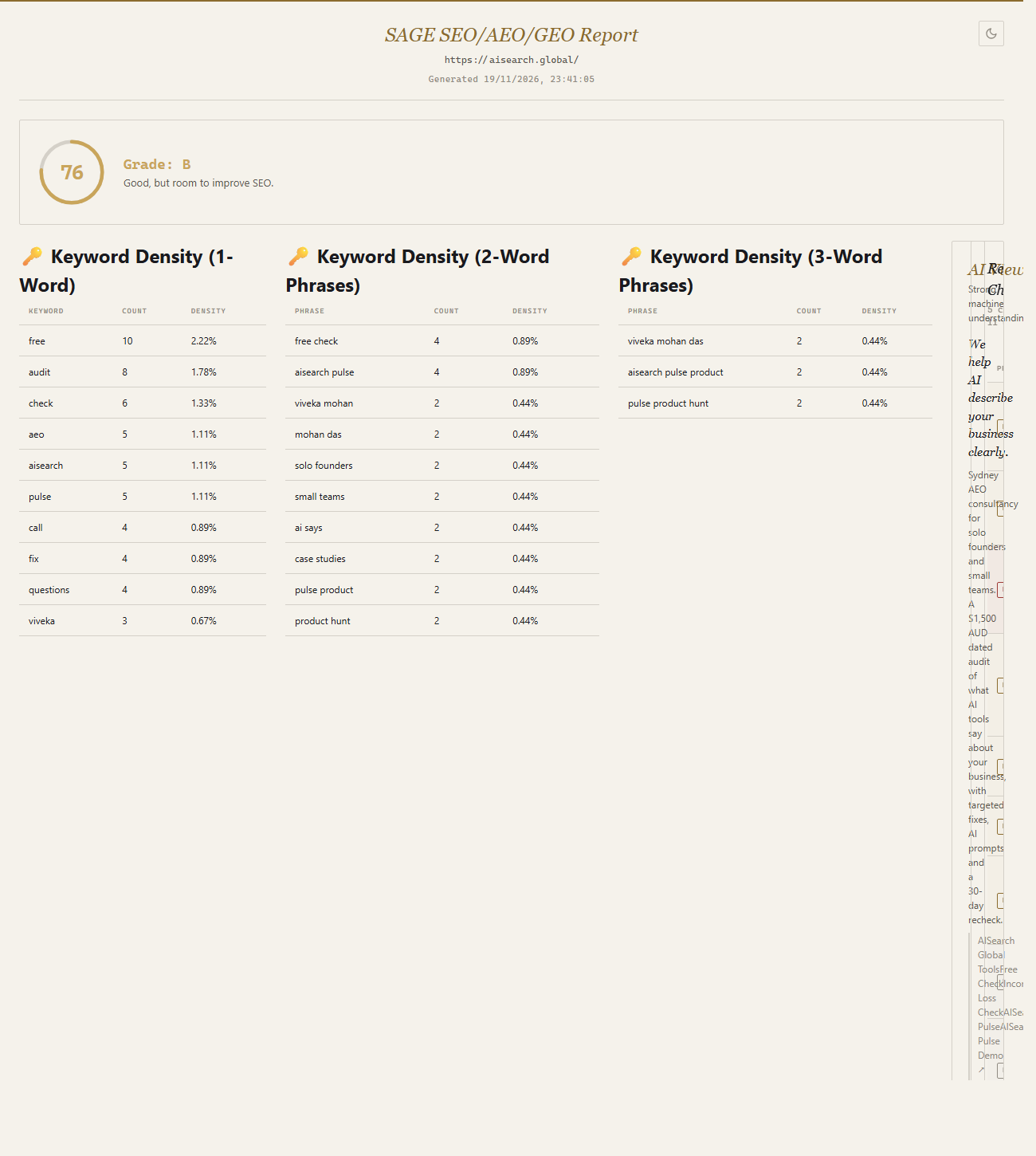
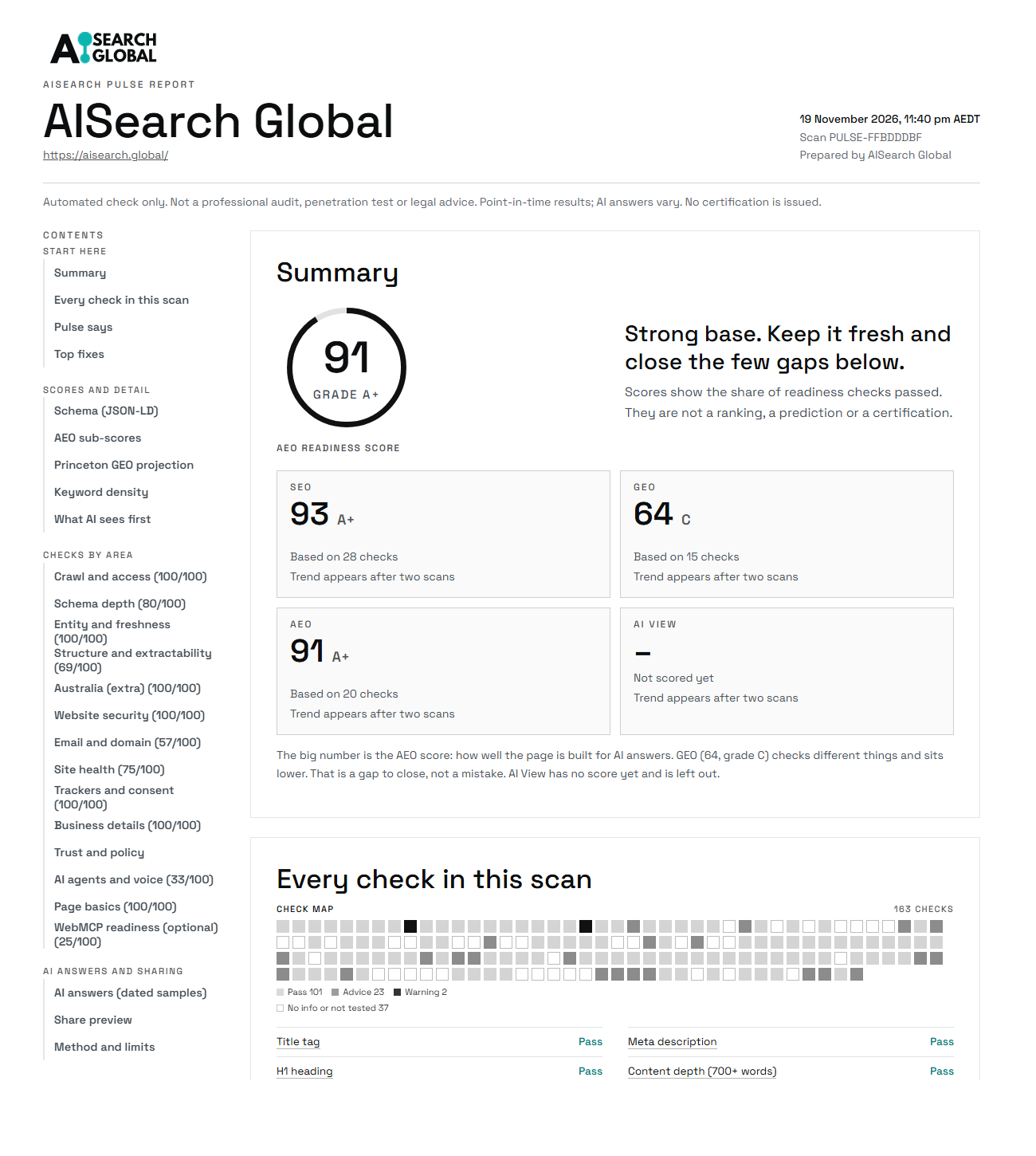
On 19 November 2026 we scanned aisearch.global with two browser tools on the same night. SAGE gave the page 76 out of 100. Our own AISearch Pulse gave it 91. This page shows both reports and explains, check by check, why the numbers differ.
At a Glance
The Short Answer
Neither number is wrong. The two tools read the same page and agree on most of what they both look at. The scores differ because each tool checks different things and weighs them differently. A score from one tool cannot be compared with a score from another.
We scanned the page with both tools at 11:01 pm Sydney time. After reading SAGE's report we added three things to Pulse, then scanned again with both tools at 11:40 pm and 11:41 pm. Both scores stayed the same.
The Two Reports, Side by Side
These are the HTML reports each tool exported from the second scan, opened in the same browser at the same width (1,300 pixels) and captured from the top of the page. Select either one to open it at full size.
Checklist: What Each Tool Checked on This Page
A tick means the check appears in that tool's report of our page. A cross means it does not appear. This is one page on one night, so a cross is not a statement about everything a tool can do. The Pulse column shows Pulse after the three additions described further down.
| Check | SAGE | AISearch Pulse |
|---|---|---|
| Title, meta description and canonical | ✓ | ✓ |
| Heading order and single main heading | ✓ | ✓ |
| Schema found and types listed | ✓ | ✓ |
| Schema properties checked on every nested item, with a count | ✓ | ✓ Count added that night |
| Image alt text and modern image formats | ✓ | ✓ |
| Internal links | ✓ | ✓ |
| Reading ease | ✓ | ✓ |
| Voice readiness (paragraph length, FAQ markup) | ✓ | ✓ |
| Keyword density | ✓ | ✓ |
| Accessibility basics (language, skip link, form labels) | ✓ | ✓ |
| Redirects and HTTPS | ✓ | ✓ |
| What AI sees first on the page | ✓ Scored | ✓ Listed, not scored |
| A score for every category | ✓ 15 categories | ✓ 13 areas, added that night |
| WebMCP readiness, scored | ✓ Counts toward the total | ✓ Own area, kept out of the total, added that night |
| robots.txt read | ✗ Skipped on this scan | ✓ |
| llms.txt read | ✗ Skipped on this scan | ✓ |
| X-Robots-Tag header read | ✗ Skipped on this scan | ✓ |
| Each AI crawler listed as allowed or blocked | ✗ | ✓ |
| Security headers | ✗ | ✓ |
| Malware and phishing lists | ✗ | ✓ |
| Email settings (SPF, DMARC, DKIM) and domain expiry | ✗ | ✓ |
| Speed lab test and Core Web Vitals | ✗ | ✓ |
| Trackers and consent | ✗ | ✓ |
| Statistics, citations and quotations counted | ✗ | ✓ |
| Schema written for you to paste | ✗ | ✓ |
| ABN checked against the public register | ✗ | ✓ |
| Australian business details (GST wording, postcode and state, phone format) | ✗ | ✓ |
Where the Two Tools Agree
Both tools found the same weak spots on our page:
- The meta description is 178 characters, longer than the 160 both tools suggest.
- The main headline, "We help AI describe your business clearly.", contains none of the words the page uses most.
- Readable text is a small share of the page source: SAGE says 7%, Pulse says 8%.
- One of three images uses a modern format such as WebP.
- Most headings have no ID for deep links.
- About a quarter of paragraphs are the length a voice assistant reads well: SAGE says 25%, Pulse says 23%.
- The page has almost no headings written as questions.
When two tools built by different people land on the same list, that list is worth acting on. These are now on our own fix list.
What SAGE Showed Us, and What We Changed That Night
SAGE did three things on our page that Pulse did not do as clearly. We added all three to Pulse the same evening and scanned again. The Pulse score stayed at 91, because none of the three counts toward it.
- A score for every category. SAGE gives each of its fifteen categories a score out of 100, which makes it quick to see which area drags the total down. For us it was "Answer Targeting and Snippets", at 6 out of 100, because the page has so few question headings. Pulse showed passes per area, such as "4 of 5 passed". It now shows a score out of 100 beside each area as well.
- WebMCP. This is an emerging way for AI agents to use the forms on a page. SAGE scores it as a full category, and our page got 19 out of 100. Pulse had one information line. It now has a WebMCP area with four checks, where our page passes 1 of 4. Pulse keeps that area out of the main score and out of the fix list, because WebMCP is not a requirement.
- Counting schema gaps on every item. See the schema section below.
Where Pulse Looks and SAGE Did Not on This Page
Three of SAGE's checks were skipped on our page with the note "Host permission not granted": robots.txt, the X-Robots-Tag header and llms.txt. Pulse read all three. It found the robots.txt file, confirmed that each of the eleven AI crawlers it lists is allowed, and found both llms.txt and llms-full.txt.
Pulse also covers areas outside the page itself:
- Website security: eleven checks, including HTTPS enforcement and Google's malware and phishing lists.
- Email and domain: SPF, DMARC, DKIM and the domain's expiry date.
- Speed: a lab test of mobile and desktop loading.
- Australian business details: Pulse is optimised for Australian businesses. It checked our ABN against the public register, looked for GST wording near prices, matched the postcode to the state and checked that phone numbers use an Australian format. It is priced in Australian dollars.
Those Australian checks are advice only, not legal advice.
The One Real Disagreement: Schema
SAGE reported 35 schema "validation issues" on our page. At 11:01 pm Pulse reported no missing required properties and eight missing recommended ones, with no count of how many items were affected. We checked the page to see why the two looked so different.
Our homepage lists the organisations that issued the founder's certifications. Each is written into the schema as an Organization with a name and nothing else. There are 29 of them. SAGE counts each one as "Organization: missing url", which accounts for 29 of its 35 issues. The other six are WebApplication entries with no "offers" property.
Both tools were reading every nested item. SAGE counted each one, and Pulse listed each kind of gap once. SAGE's count is accurate and more useful, so Pulse now gives the count too: it reports Organization.url missing on 29 items and WebApplication.offers missing on 6, the same numbers as SAGE. The difference that remains is the label. SAGE calls these validation issues. Pulse calls them advice, because schema.org does not require a web address on a certificate issuer. We will add them where the issuer has an official page.
Smaller Differences
The tools count some things differently. SAGE counted 450 words on the page and Pulse counted 937, most likely because they treat menus and repeated blocks differently. Reading-ease scores differ too: 74 from SAGE and 65 from Pulse. Neither changes what to fix.
What a Score Does and Does Not Tell You
The scores in both reports come from how the page is built. They do not come from asking ChatGPT, Gemini or Perplexity what they currently say about a business. A high structural score does not guarantee that an AI tool will mention you. Pulse's own report says so at the top.
If you want to check your own page, AISearch Pulse has a free version, and how Pulse works explains what happens when you press Scan. Run a second tool as well, and read both reports yourself. Where two tools agree, start there.
Why Our Own Tool Is in This Comparison
AISearch Pulse is our own product, so weigh this page as a seller’s account. We are not saying Pulse is the right tool for you, and a higher number from our own tool on our own page proves nothing about either tool. We ran SAGE because we wanted to see what a tool built by someone else would find on our page. It found three things Pulse was not showing clearly, and we are glad it did. Run both on a page you know well, read both reports, and decide which one tells you what you need.
How We Ran It
- Page: https://aisearch.global/, our own homepage.
- First scans: SAGE and AISearch Pulse, 19 November 2026, 11:01 pm Sydney time.
- Second scans: AISearch Pulse at 11:40 pm (Scan ID PULSE-FFBDDDBF) and SAGE at 11:41 pm, after the three additions to Pulse. SAGE's results were the same in both of its scans.
- Sources: each tool's own exported reports. Everything said here about SAGE comes from its exports of our page.
- Limits: one page, one night. A different page, or different settings in either tool, can give a different picture.
Check your own page
AISearch Pulse has a free version. If you want to know what AI says about your business, book a free 20-minute call.